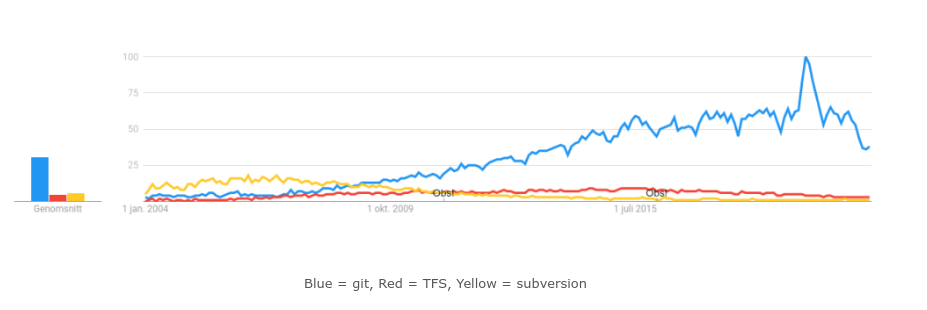
When I started working as a developer I didn’t actually start with git but with TFS. Nowadays, everywhere I go git is standard and based on google trends (picture below) and my experience with both of them I will be doubtful that will change anytime soon.
In the past weeks, I’ve invested some extra time in revisiting my git aliases and this is my result:
[alias]
         a  = add
        ac = !"git a . && git c -m"
        amend = !"git c --amend"
        oops = !"git commit --amend --no-edit"
        oopsf = commit -a --fixup
        ap = add --patch
        back = !"git reset HEAD^1"
        b = branch
        ba = "!git for-each-ref --sort='-authordate' --format='%(authordate)%09%(objectname:short)%09%(refname)' refs/heads | sed -e 's-refs/heads/--'"
        c = commit
        cam = !"git c -a -m"
        cm = !"git c -m"
        co = checkout
        conf = !"git config --global --edit"
        cb = "!git ba | git grep {$1}"
        cob = checkout -b
        create = "!bt() { git co -b BT-$1-$2; git push -u -o merge_request.create -o merge_request.remove_source_branch -o merge_request.title=\"Draft: BT-$1 $3\"; }; bt"
        navigate = !git add . && git commit -m 'WIP-mob' --allow-empty --no-verify && git push -u --no-verify
        drive = !git pull --rebase && git log -1 --stat && git reset HEAD^ && git push --force-with-lease
        cleanit = !"g co . && g clean -df"
        d = diff
        dt = difftool --dir-diff
        f = fetch
        last = log -1 HEAD --stat
        lg1 = log --graph --abbrev-commit --decorate --format=format:'%C(bold blue)%h%C(reset) - %C(bold green)(%ar)%C(reset) %C(white)%s%C(reset) %C(dim white)- %an%C(reset)%C(bold yellow)%d%C(reset)' --all
        la = "!git config -l | grep alias | cut -c 7-"
        p = push -u
        pu = pull --rebase
        r = reset
        rl = reflog
        rs = reset --soft
        rsl = reset --soft HEAD~1
        rh = reset --hard
        rhl = reset --hard HEAD~1
        rb = rebase --interactive
        rbas = rebase --autosquash --interactive
        rba = rebase --abort
        rbc = rebase --continue
        rbs = rebase --skip
        please = push --force-with-lease
        t = !"git lg1"
        st = status
Many of them are self-explanatory but some might need some explanations.
If you noticed closely, I didn’t have any git merge aliases. I have been dropping them out going forward. From 1 of Jan 2021, I’ll go with git rebase completely due to cleaner git history and to have more control over what’s going on.
When I’m playing around locally, I sometimes want a simple restart button.
cleanit = !"g co . && g clean -df"git ba Will list all branches order by last modified
ba = "!git for-each-ref --sort='-authordate' --format='%(authordate)%09%(objectname:short)%09%(refname)' refs/heads | sed -e 's-refs/heads/--'"The git lg1/lg2 is just some nice git log formats that I found on stackoverflow.
lg1 = log --graph --abbrev-commit --decorate --format=format:'%C(bold blue)%h%C(reset) - %C(bold green)(%ar)%C(reset) %C(white)%s%C(reset) %C(dim white)- %an%C(reset)%C(bold yellow)%d%C(reset)' --all

lg2 = log --graph --abbrev-commit --decorate --format=format:"%C(bold blue)%h%C(reset) - %C(bold cyan)%aD%C(reset) %C(bold green)(%ar)%C(reset)%C(bold yellow)%d%C(reset)%n'"
The git la will list all git aliases.
la = "!git config -l | grep alias | cut -c 7-"Lastly, I have bind g = git.
In bashrc:
#g for git
alias g='git'
source /usr/share/bash-completion/completions/git
complete -o default -o nospace -F _git g
In Powershell, open $PROFILE
Set-Alias g gitHappy coding!