Sometimes the next step in an investigation is to look at the database. Has a record changed status? Are there other records in the same state? How many were created during the period we are investigating?
Writing the SQL is only part of that work. I also need to understand the schema, choose the right environment and make sure the query answers the question without doing unnecessary work on the database.
My sql-server-reader skill gives the AI assistant a workflow for that. It uses the available repository and database context to prepare a read, explains what it expects the query to do, and lets me review it before execution.

Start with a question
I can describe what I need without writing SQL first. The examples here use the skill’s Claude Code command:
/raholsn:sql-server-reader Look up the current status of export job <id> in the staging reporting databaseOr start with a broader question:
/raholsn:sql-server-reader Count export jobs created in the staging reporting database between April 22, 2026 00:00 UTC and April 23, 2026 00:00 UTC, grouped by current statusThese are illustrative examples. The identifier, target and available entities depend on the configuration. I can also supply a SELECT statement for the AI to review.
The distinction between those questions matters. A lookup needs the relevant record. A count needs an aggregate over the intended population. Returning the first twenty rows and counting them would not answer the second question.
Before preparing the read, the AI checks the context it has: repository queries, schema definitions, entity descriptions and company guidance. If the target or meaning of a field remains unclear, it asks.
Two ways to reach the data
The skill supports two Microsoft tools. The configured connection determines which path it uses.
| Microsoft SQL MCP Server | Microsoft sqlcmd | |
|---|---|---|
| Connection | MCP access to selected entities | Direct connection to a configured server and database |
| Prepared read | Structured arguments supported by the exposed tools | A bounded SELECT statement and client invocation |
| Context | Entity descriptions and available fields | Repository evidence and approved metadata queries |
Microsoft SQL MCP Server is built on Data API builder. It exposes configured entities through tools and applies the configured permissions. The reader skill discovers the actual read operations available; it does not treat that connection as an endpoint for arbitrary SQL.
For environments with direct database access, sqlcmd runs the prepared SQL. The skill checks the installed variant before choosing authentication and connection options.
The company supplies the connection, read permissions and relevant database context. Adding a target name to a profile does not establish access. If MCP cannot express a query or cannot reach an entity, the skill reports the limitation. Switching to direct SQL needs a configured target and explicit authorization for that scope.
Review the read before running it
This is the central interaction. The AI presents the exact SQL or structured MCP arguments, the target and environment, the limits, and a short assessment of the likely database work. Then I choose:
| Choice | What happens |
|---|---|
| Run | Execute the displayed read once its access and performance requirements are satisfied. |
| Cancel | Stop the proposed read. |
| Edit | Revise the proposal, reassess it and show the choices again. |
That review also applies when I supplied the SQL myself. The initial request starts preparation; the displayed proposal is what I approve. After I choose Run, the skill does not ask for a second confirmation for that same operation.
Permission checks, catalog queries and estimated-plan queries need their own approval too. Local files and non-query MCP descriptions can be inspected during preparation. A changed query, target or budget, or a retry after failure, needs a new reviewed proposal.
For MCP, I can approve a bounded read that includes pagination, provided the preview states the total budget. That does not authorize unrelated follow-up queries.
Workflow diagram
The diagrams describe the skill instructions, not a recorded database investigation.

Open the overview at full size
Explore the two read paths
The sequence shows preparation, the execution decision and how the MCP and sqlcmd paths return their evidence.
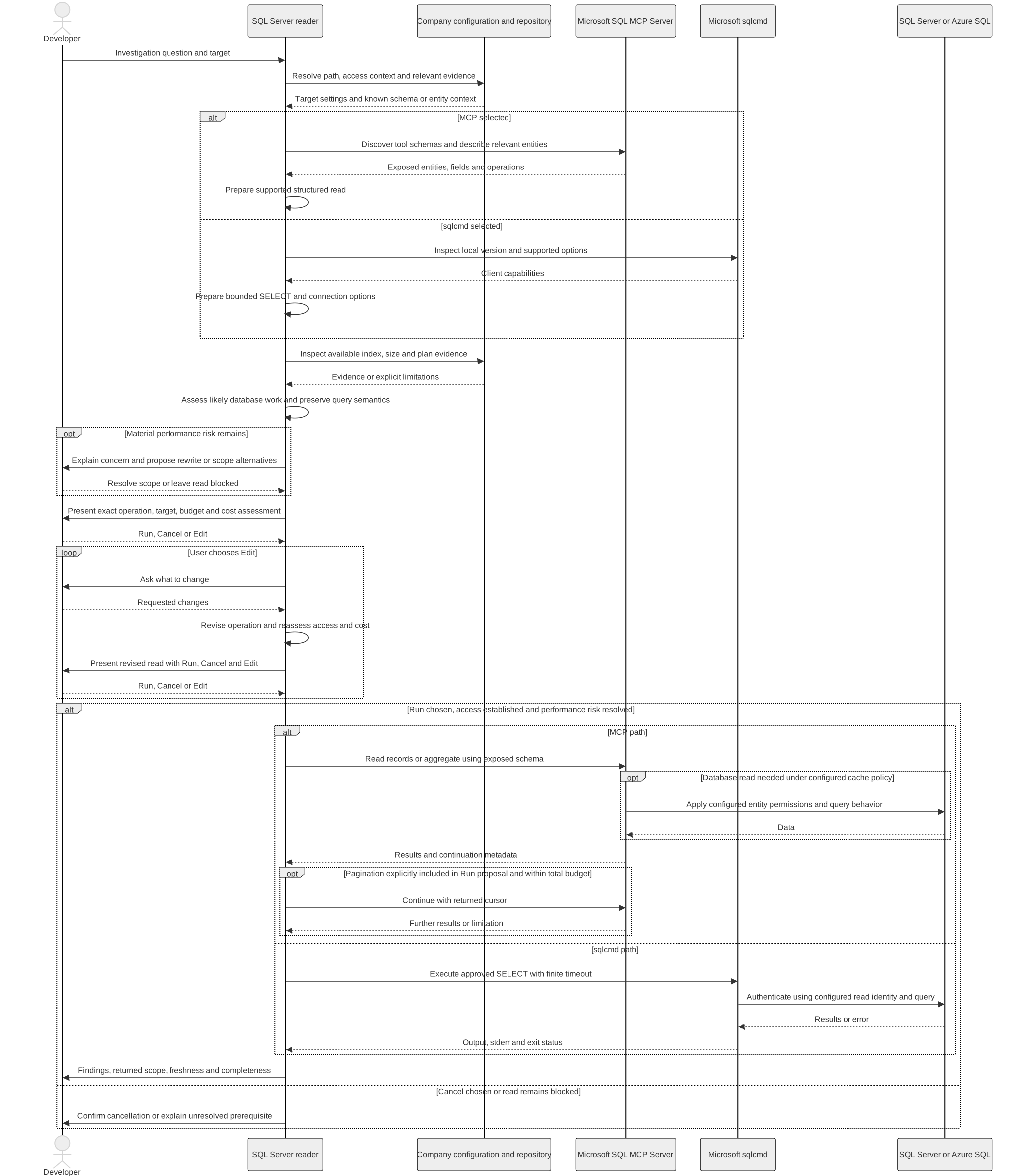
A small result can still mean a lot of work
A query returning twenty rows might still need to sort a large dataset. A count returns one value, but calculating it can involve many records. Row limits and timeouts are useful limits; they do not establish that a query is inexpensive.
The skill reviews filters, joins, ordering and aggregation against the available index, size and plan evidence. A migration can show that an index was intended. It does not prove the index exists in the target database or that the query will use it.
For the export-job example, the created-time filter needs to match the stored timestamp semantics. A suitable range may let the database use an index more effectively than applying a function to each stored timestamp. Any rewrite still has to preserve the requested time window and answer.
If the likely cost remains a material concern, the AI should explain it and resolve the scope before running. Quietly shortening a month to a day would change the question. An existing reporting target or summary view might be appropriate, but that choice needs to be visible.
I want this assessment to help me review the read. It is not a promise of a particular execution plan or runtime.
Explain what the result proves
Suppose the illustrative lookup returns an export job in a failed state. That establishes the returned state, subject to the connection's freshness limits. It does not explain why the job failed. The next step might be to follow its identifier through the logs.
The count example has a similar distinction: jobs created during a time window, grouped by their current status, does not tell me how many changed to failed during that window. Those questions need different evidence.
A useful answer should include:
- The target, filters and fixed time bounds used.
- Whether the result is a lookup, sample or complete aggregate.
- Any remaining pages, truncated values or missing fields.
- Known freshness limits, including caching on the MCP path.
- The conclusion supported by the data and what remains unknown.
Separate pages are not automatically a consistent snapshot of changing data. With sqlcmd, successful execution does not by itself prove that formatted output captured every value. Those limits matter when drawing a conclusion.
Read access is part of the setup
The skill has no write mode. It does not modify records, create indexes, execute stored procedures or change permissions during an investigation. The underlying tools support more than reading, so the configured permissions need to match the intended access. Instructions alone are not database access control.
Results stay in the conversation by default. Exports require an explicit request, and the skill does not create an automatic local audit log. It can report available query or audit identifiers without claiming that every read has been durably recorded.
The skill
You can find the sql-server-reader skill on GitHub.
The full instructions will live there, including connection setup and query-review rules. This article describes the workflow as of its updated date.
For me, the useful part is being able to ask a database question where I am already working, then review how the AI proposes to answer it. I still own the decision to run the read and the conclusions I draw from the result.
Happy coding!