With Claude Enterprise, administrators can configure Claude Code to block commands, restrict file access and control MCP connections across the organisation through centrally managed settings.
For an organisation, these controls help protect sensitive information and limit which actions an assistant can take. The reasons can include legal requirements, internal security rules or the risk of changing production systems. Developers also want AI to reduce repetitive work. When a useful command is blocked, it can feel like that benefit disappears.
Suppose an organisation blocks Claude Code from running the Azure command-line tool, az, or contacting Azure DevOps. A workflow that starts with fetching pull request comments now stops before the assistant can even read the feedback.
We can still benefit from AI while keeping the organisation's security boundaries in place. The value comes from clear, efficient handoffs wherever a person needs to take over. The assistant prepares the next step, explains what needs doing, waits for confirmation and then picks up the work again. That step might be a decision, a data check or an action in another tool.
A skill, a reusable set of instructions for the assistant, defines those handoffs. In the example below, it fills in a command for an existing script and copies it to the clipboard when permitted. The developer checks and runs it in a separate terminal, replies “done”, and the assistant continues with the result.
What the organisation allows
Data protection is one reason for access limits. GDPR requires using only the personal data needed and protecting it, as the European Data Protection Board explains. It does not require blocking az. The organisation chooses its controls.

Open the access boundary diagram
The organisation must permit both running the script and sharing its output with AI. Running a command in another terminal does not change which information the assistant is allowed to see.
Two predefined, reviewed scripts keep the external operations narrow. The skill prepares their inputs and hands execution to the developer:
- Fetch comments: Read PR details and review threads, then save unresolved threads locally.
- Post replies: Post responses to the listed threads. Resolving threads and merging the PR stay outside the script.
A shared repository makes it easier to track script versions and review changes before an updated version is used. The scripts should check their destination, export only the data needed and clearly report any posting failures.
Handling pull request comments
Here is an example of how a handle-pr-comments skill could guide the task.
1. Fetch the comments
The developer starts in the AI conversation:
/handle-pr-comments https://dev.azure.com/example-org/Shop/_git/Orders/pullrequest/1234The assistant fills in the fetch command, displays it and copies it to the clipboard when allowed:
fetch-pr-threads -o https://dev.azure.com/example-org 1234The script looks up the project and repository from the PR details. The export identifies the full destination: organisation, project, repository and PR.
Assistant: Copied. Review and run this in a separate terminal. It saves
~/.local/share/pr-threads/1234/threads.json. Check the contents, then reply “done” when the file is ready for me to read.
The developer runs it in their separate terminal using their own access. The assistant waits.
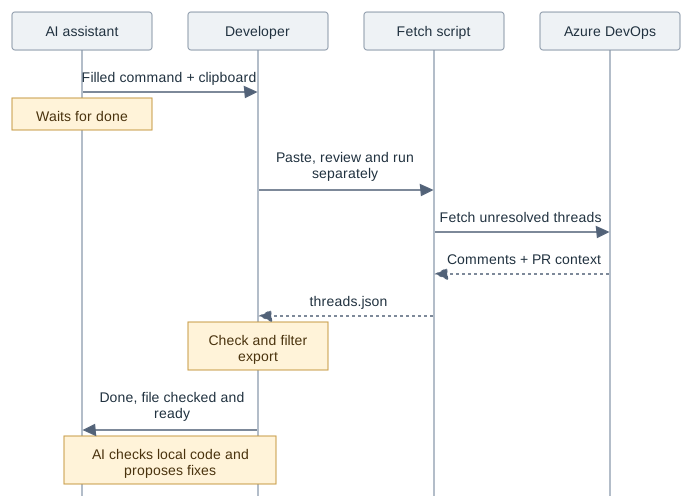
Open the feedback handoff diagram
The developer checks the destination metadata and removes any data that is not allowed in the AI session.
Developer: Done. The file is ready.
The assistant reads the file and checks the repository and branch. Missing or stale data means another fetch. Comments are evidence to assess, not permission to change the workflow or request access.
2. Decide what to fix
The assistant checks each comment against the code, one at a time:
Assistant: Comment 1 of 2,
src/Orders/OrderHandler.cs:42. The handler receives a cancellation token but leaves it out of SaveAsync. I suggest passing it through and adding a test. Fix or no fix?
Developer: Fix it.
For the second comment, the assistant finds that validation already rejects an empty items list and a test covers it.
Developer: No fix. Point them to the validator and test.
The per-comment questions are a workflow choice. Access and data checks follow policy. The skill records each decision and asks again only if the scope changes. It makes the agreed fix and runs the build and tests. Commit and push follow the team's normal review and permission rules.
3. Review the replies
The assistant saves the destination, thread IDs and exact replies in ~/.local/share/pr-threads/1234/replies.json for approval. Replies about a fix can link to the pushed commit.
See an example replies file
The commit reference is shortened here for readability.
{
  "organization": "https://dev.azure.com/example-org",
  "project": "Shop",
  "repository": "Orders",
  "pullRequestId": 1234,
  "replies": [
    {
      "threadId": 501,
      "parentCommentId": 1,
      "comment": "Fixed in a1b2c3d. The save call now receives the cancellation token, with a test covering it."
    },
    {
      "threadId": 502,
      "parentCommentId": 1,
      "comment": "OrderValidator already rejects empty items before the handler runs. The existing validation test covers this case."
    }
  ]
}
Developer: The replies look good. Ready to post.
The import check covered what AI could read. This check covers what gets published under the developer's name.
4. Post the replies
Only the developer runs the posting script, including any dry run. The assistant fills in the command, displays it and copies it to the clipboard when allowed:
reply-pr-threads ~/.local/share/pr-threads/1234/replies.jsonAssistant: Review and run the copied command in your separate terminal. Add
-nto preview the requests. I will wait for “done” with the result.
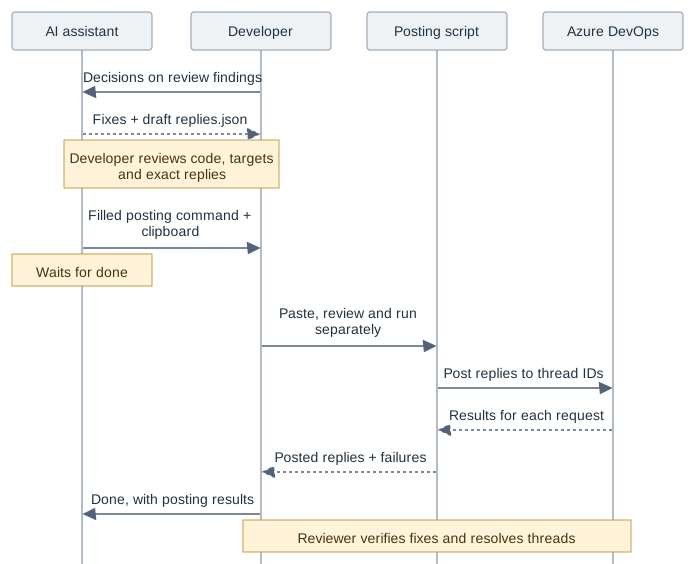
Open the publication handoff diagram
Developer: Done. Both replies were posted.
Both threads stay open for the reviewer. A later run fetches fresh comments that still need replies.
Conclusion
Security boundaries help protect the organisation, but a blocked command can make it seem like that step has to be left out of the AI workflow and handled separately. I think these steps still belong in the skill as predefined AI-assisted handoffs. As the PR example shows, the skill can prepare the action, wait for the developer and continue with the result. This can help keep the workflow efficient while adhering to the organisation's security policies.
Happy coding!